


Setup takes a few minutes. You connect your Amazon, Shopify, or Walmart account and choose the data you want in Google Sheets. After that, data loads and syncs automatically in the background going forward.
.svg "Gorilla ROI")
See How Your Amazon Ads Are Actually Performing
Sponsored Products
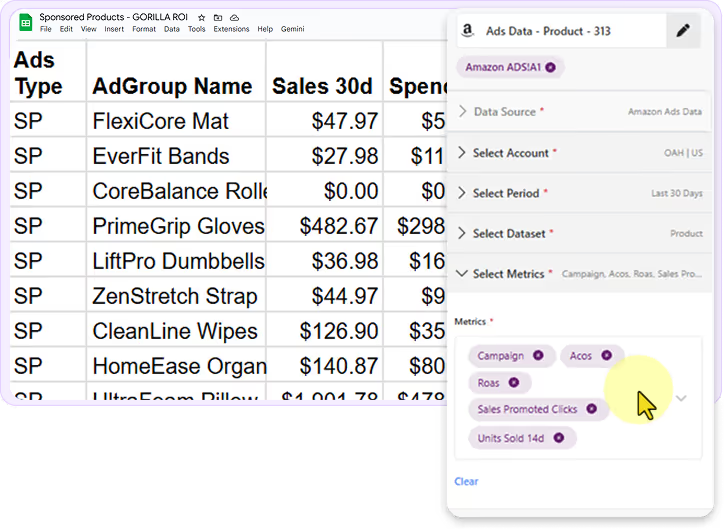
View campaign, ad group, and keyword data together in Google Sheets without jumping between reports.

Spend, sales, and order data
Keyword and search term performance
ACOS, ROAS, CTR, and clicks
Historical performance over time
See Sponsored Brands performance in Google Sheets without switching views or dashboards.
Video Views and Impressions
Sessions and Clicks
ACOS, ROAS, and CTR
Spend, sales, and conversions
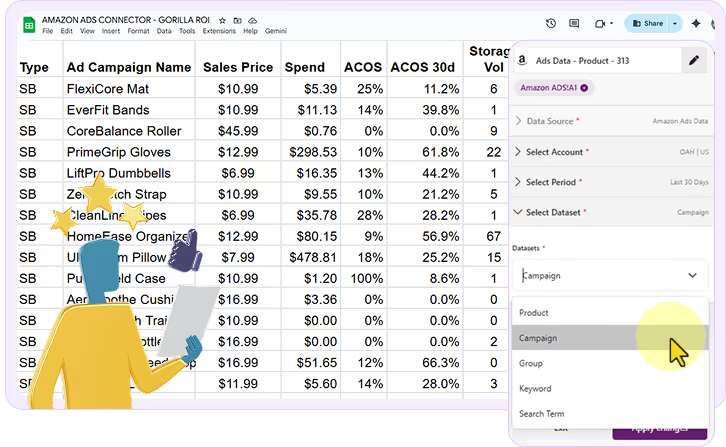
Sponsored Brands
Smarter Reporting in Google Sheets
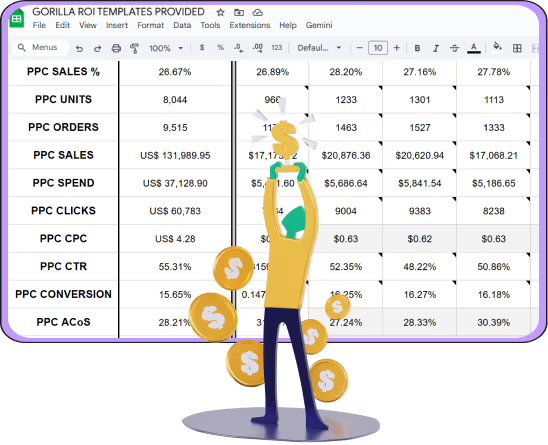
Turn Amazon Ads data into clear, repeatable reports that fit how your team works.
Structured data easy to filter
Works with formulas, pivots, and charts
Compare performance across time
Reports that match your workflow
Working Data in Three Steps
.svg "White download symbol indicating file or data transfer")
Step 1: Add Gorilla ROI to Google Sheets
.svg "Hyperlink or connection icon with emphasis marks")
Step 2: Connect to Amazon Ads

Step 3: View Ads Data in Sheets
Trusted by Multi-Million Dollar Teams
Used by serious ecommerce teams operating in Google Sheets








I’ve been using Gorilla ROI for 3 years to manage an Amazon agency with over 10 accounts—it’s been absolutely invaluable. Pulling data directly into Google Sheets makes analysis and planning so much easier. Once you get past the initial learning curve, it saves a ton of time and gives you full control over how you report and visualize data.

Glen Carscadden
Sales Operation Manager
Ridgeline Insights

If you use spreadsheets a lot, sell on Amazon, and value your time - Gorilla ROI is a no brainer. Monitoring our ASINs, graphing sales data, and creating automated tools for product and FBA management. There really isn't anything else out there that makes your Amazon data more accessible and quicker to access.

John Derringer
CEO
Driven Products

This has made analyzing store activity so much easier! There's no reason to rely on Excel Sheets that are only as current as your latest export.

Trent Guyer
VP Marketing & Digital Strategy
Grasshopper Mower

Gorilla ROI is an absolute game-changer. There is truly nothing else like it on the market. It has saved my team over 40 hours per month by automating the exact data pulls we used to do manually.

Claire Davies
GNO Partners Agency

Brilliant app that pulls data from Amazon and turn them into powerful spreadsheets. Highly customizable with a vast amount of useful custom features and formulas.

Sam Kwong
CEO
Autoline Pro

.webp)
Frequently
Asked Questions

How long does setup take?
How does it get data into Google Sheets?
Gorilla ROI connects directly to your ecommerce platforms and syncs structured data into Google Sheets automatically. Once connected, data stays available without re-downloading files.
What platforms can I connect?
Gorilla ROI supports Amazon, Shopify, and Walmart. The focus is ecommerce operations rather than connecting dozens of unrelated platforms.
Will my data stay accurate and update automatically?
Yes. Once connected, data syncs automatically based on your settings so Sheets stays current without manual exports or re-imports.
Does the data match my platform?
Yes. Gorilla ROI pulls data directly from the source. What you see in your sheet matches what the platform API reports.
Do I need coding or technical skills?
No. Gorilla ROI works through a point-and-click interface inside Google Sheets. Advanced users can use formulas if they want, but coding is not required.
Try Gorilla ROI Free For 30 Days
Replace the Manual Spreadsheet Work and Save 40 Hours a Month