.svg "Gorilla ROI")

Article Summary
✅ Zapier is excellent for event-based automation. Works when one event should trigger one or more actions, like a Slack alert, task, email, CRM update, or row added to a sheet.
✅ Amazon, Shopify, and Walmart data needs to be pulled in bulk, structured, refreshed, joined, and analyzed.
✅ Gorilla ROI is a Zapier alternative only for ecommerce data in Google Sheets. It is not a replacement for Zapier’s app-to-app automation work.
Zapier vs Gorilla ROI for Amazon ecommerce data?
For the broader comparison and alternatives list, see our Gorilla ROI alternatives guide.
10 Years of Paid Use and Still Using
I am still paying for Zapier after 10 years.
That should tell you where I stand.
Zapier is a great tool when you want to automate events. When this happens, do that. A form comes in, send a message. A customer sends a message, send it to Slack. A Shopify order comes in, add a row or notify the team.
Where I ran into the wall was trying to treat Zapier like an Amazon or ecommerce reporting system. I tried using it for Amazon. The use case became limited fast because everything is event-based and not suited to analyze performance or know what needs to be done next.
But Zapier is still in my stack.
I just would not make it the data layer for Amazon, Shopify, or Walmart reporting.
The Task Math Gets Ugly Before the Spreadsheet Gets Useful
At ecommerce volume, order-by-order automation can burn through usage before it becomes a real reporting system.
Zapier pricing and task explains the model clearly: a Zap has a trigger and one or more actions, and each successful action counts as a task. Triggers do not count, but the actions after the trigger do. Zapier also says the number of tasks needed depends on how frequently your Zaps run and how many actions they complete.
Now put that into a real ecommerce account.
If you are doing 200 orders per day and you create a simple order Zap with 3 actions:
- Add the order to Google Sheets
- Send a Slack message
- Create a task or tag the order somewhere else
That is 600 tasks per day.
That is roughly 18,000 tasks per month before you have touched refunds, inventory, fees, ad data, settlement data, historical pulls, or multi-channel reporting.
Zapier Is an Event Tool First
Zapier works best when the unit of work is one event.
Zapier Amazon Seller Central integration page describes a trigger as the event that starts a workflow and an action as the event a Zap performs. The same page shows Amazon Seller Central workflow examples like sending Slack messages for new Amazon orders, adding new Amazon orders to Google Sheets, sending Amazon orders to Google Ads, and creating sales orders in other systems.
- A new event happens.
- Zapier catches it.
- Zapier performs one or more actions.
- Another app receives the result.
Multi-step Zaps are where Zapier becomes powerful. One event can create a task, notify a channel, update a CRM, format data, and send a follow-up.
For that job, Zapier is excellent.
Amazon Reporting Is Not an Order Alert
But, Amazon reporting needs more than new order events.
A new order tells you one thing happened. It does not tell you whether the SKU is profitable, whether you are going out of stock, which ASIN is performing best today.
If you are building Amazon seller data in Google Sheets, you need datasets your team can use:
- Orders
- Sales
- Inventory
- Refunds
- Fees
- Settlements
- Amazon Ads data
- SKU-level source tabs
- Date ranges
- Historical rows
A row added from a new order trigger is not the same thing as a database of your own store data inside Google Sheets.
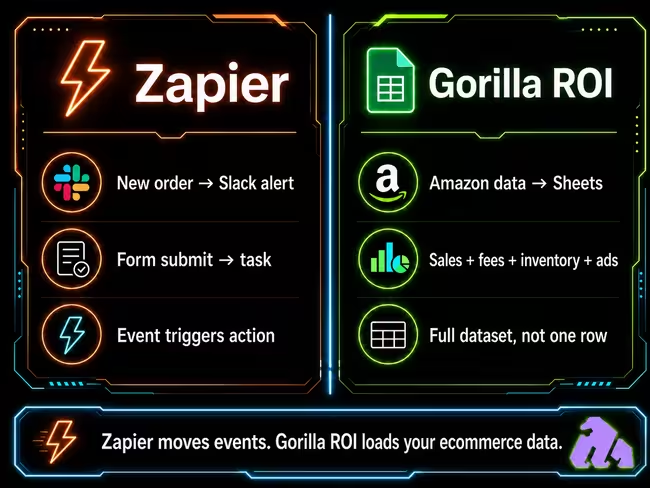
Zapier vs Gorilla ROI Differences?
Zapier moves events between apps. Gorilla ROI pulls ecommerce datasets and reports into Google Sheets.
I do not want my screwdriver doing hammer work. I also do not want my hammer pretending it is a screwdriver. It's the same between Zapier and Gorilla ROI. We both have different uses.
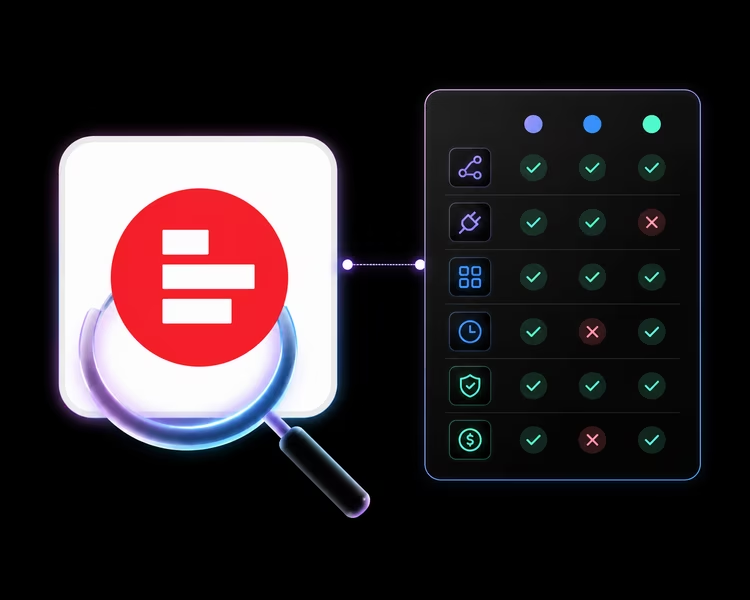
See the table to better understand.
Where Zapier Is the Right Call
Zapier is the right call when one event should create one or more actions. Use Zapier for workflows like:
- New order alert to Slack
- New form submission to task
- New customer to CRM
- New support ticket to project board
- New paid Shopify order to a spreadsheet row
- New refund request to internal review
- Supplier invoice to accounting workflow
- Restock request form to ops notification
These workflows are clean because the event itself is the job.
We are not trying to replace Zapier’s automation dominance.
Where Zapier Lacks for Serious Sellers
Zapier gets weak when you go from “do something when this happens” to “give my team a complete dataset they can analyze.”
You need to answer questions like:
- What sold yesterday across all channels?
- Which SKUs are close to stockout?
- Which products had refunds this week?
- Which fees changed margin?
- Which settlements need review?
- Which Shopify SKUs map to Amazon SKUs?
- Which Walmart data belongs beside Amazon and Shopify?
- Which report can the team trust Monday morning?
These are dataset questions and if your team is trying to build a FBA P&L spreadsheet, you need orders, referral fees, FBA fees, storage costs, ad spend, and settlement data in tabs that can reference each other.
If you are tracking Amazon advertising metrics, you need ad data beside sales and SKU data. A new order trigger does not give you that context.
Zapier can move data when an event happens. It is not built to become your structured ecommerce reporting layer. Unfortunately, it's not the right Amazon seller software for serious operators.
Why One Row Per Order Still Falls Short
Adding each new order to Google Sheets can look like reporting at first. but a reporting sheet needs context. It needs refreshable source tabs. It needs historical data. It needs clean structure. It needs to survive more than one workflow.
That is not Zapier’s core job.
Where Gorilla ROI Fits Instead
We built Gorilla ROI for the spreadsheet work once your store grows and you outgrow manual spreadsheets.
Our job is narrow: pull Amazon, Shopify, and Walmart data into Google Sheets so your team can work from structured source tabs instead of CSV exports or event-by-event rows.
That includes:
- Amazon orders
- Amazon sales
- Amazon inventory
- Amazon fees
- Amazon settlements
- Amazon Ads
- Shopify store data
- Walmart seller data
- SKU-level reporting
- Multi-channel workbooks
If you need an Amazon sales tracker in Google Sheets, you do not need every sale to trigger a Zap. You need sales data ready in a structure that can power the tracker.
If you need Shopify store data to Google Sheets, you do not just need a new order row. You need Shopify data that can sit beside Amazon and Walmart without your team rebuilding the workbook.
We Run Both Because They Do Different Jobs
Zapier and Gorilla ROI can sit in the same business with no conflict.
That is how I think about it.
Use Zapier for the automation layer for alerts based on events:
- Send a Slack alert
- Create a task
- Route a form
- Update a CRM
- Move a file
- Trigger a follow-up
Use Gorilla ROI for the ecommerce data layer:
- Pull Amazon data into Sheets
- Pull Shopify data into Sheets
- Pull Walmart data into Sheets
- Build source tabs
- Refresh datasets
- Run sales, inventory, refund, fee, and ad reviews
My Recommendation

Keep Zapier for event automation. Use Gorilla ROI for ecommerce data in Google Sheets.
That is the honest answer.
I have, and still use Zapier for over 10 years because it solves real problems and we have many things that Zapier does based on events.
But I don't bother using it for anything related to Amazon, Shopify, or Walmart data. I'm blessed, where if I hear or receive a notification of every sale, it would drive me crazy.
What I need for my team is to make sure the data is there for them to act on without asking me what to do. I want sales, inventory, refunds, fees, ads, and channel data available in a form my team can analyze without turning every order into an automation event.
That is why Gorilla ROI exists.
Which Zapier Alternative Should You Use for Ecommerce Data?
Summarized comparison on use case.
If you need something to happen, use Zapier.
If you need ecommerce data to be loaded in bulk, fast, into Google Sheets, use Gorilla ROI.
Zapier vs Gorilla ROI FAQs
Is Gorilla ROI a Zapier alternative?
Gorilla ROI is a Zapier alternative only for ecommerce data in Google Sheets. It is not a general Zapier replacement. Use Zapier for event-based app automation. Use Gorilla ROI when you need Amazon, Shopify, and Walmart data structured in Google Sheets.
Is Zapier good for ecommerce?
Zapier is good for ecommerce event workflows like alerts, task creation, CRM updates, email routing, and selected order-based automations. It is not the best fit for bulk ecommerce reporting, historical analysis, SKU-level data work, or multi-channel spreadsheet analysis.
Can Zapier pull Amazon data into Google Sheets?
Zapier lists Amazon Seller Central to Google Sheets workflows, including adding new Amazon Seller Central orders to Google Sheets as multiple rows. That can be useful for selected order workflows. It is not the same as a full Amazon reporting workbook with sales, inventory, fees, refunds, ads, and settlement data.
Can Zapier pull Shopify data into Google Sheets?
Zapier lists Shopify to Google Sheets workflows such as adding new paid Shopify orders to Google Sheets rows. That can work for event-based order capture. For Shopify reporting across sales, orders, products, and multi-channel SKU work, a structured data pull is usually the better fit.
Can Zapier replace Gorilla ROI?
Zapier does not replace Gorilla ROI when the job is structured ecommerce data in Google Sheets. Zapier moves events between apps. Gorilla ROI pulls Amazon, Shopify, and Walmart data into Sheets for reporting and analysis.
Can Gorilla ROI replace Zapier?
Gorilla ROI does not replace Zapier for app-to-app automation. We do not try to trigger every workflow in your business. We focus on ecommerce data inside Google Sheets.
Should I use Zapier or Gorilla ROI for Shopify?
Use Zapier if the Shopify workflow is event-based, such as sending a message when an order is created. Use Gorilla ROI if you need Shopify data inside Google Sheets for sales tracking, multi-channel reporting, and analysis.
Should I use Zapier or Gorilla ROI for Amazon?
Use Zapier for selected Amazon event workflows if the available trigger fits your use case. Use Gorilla ROI if you need Amazon sales, inventory, fees, ads, refunds, and SKU-level data in Google Sheets.