.svg "Gorilla ROI")

Article Summary
✅ Use Walmart Seller API data when Walmart reports are part of your weekly operating rhythm, especially orders, inventory, pricing, returns, refunds, sales, and WFS.
✅ Seller Center exports are fine for one-time checks. Recurring reporting needs repeatable data pulls with stable columns in Google Sheets.
✅ Gorilla ROI fits when your team wants Walmart seller data in Sheets without building and maintaining a direct API connection.
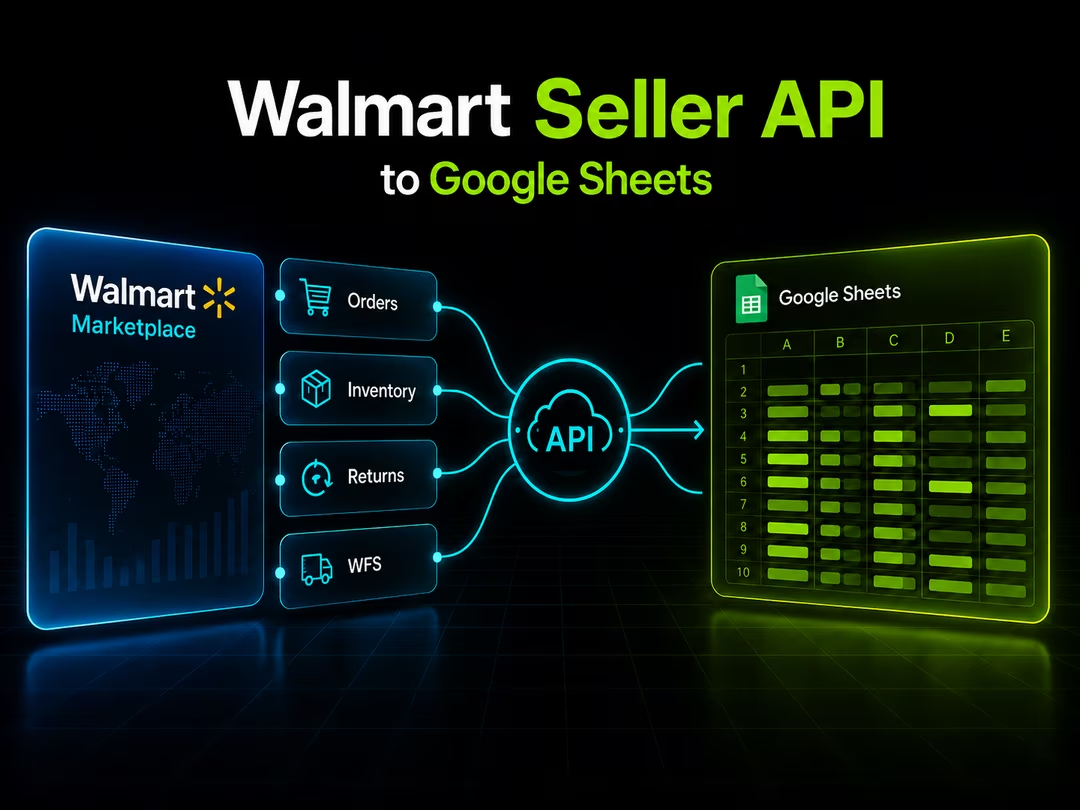
Walmart Seller API goes beyond report downloads
If you sell on Walmart Marketplace, you can log into Seller Center and download reports. That works until Walmart becomes part of your weekly reporting routine.
Your team may have orders in one file, inventory in another, returns in another, and pricing in another tab. Someone still has to download the files, clean the columns, paste them into the right workbook, fix the formulas, and hope nobody sorted the wrong range.
You can use Walmart Marketplace APIs through a seller account or connected application to work with marketplace data without downloading every report by hand.
For Gorilla ROI, the job is straightforward: get Walmart seller data into Google Sheets so your team can work from the sheet instead of logging into Seller Center for every number.
If you need the broader Walmart data overview, start with our Walmart Seller Center data guide.
Quick answer
What the Walmart Seller API does
The Walmart Marketplace APIs let your account or connected software work with data such as items, inventory, orders, prices, reports, returns, and fulfillment workflows.
You can think of the API as the path between Walmart Seller Center and the reporting system your team uses. Your team still has to decide which data belongs in the report and how the numbers should be reviewed.
You pull Walmart data from separate areas inside Seller Center.
What Walmart data sellers care about first
Your team usually cares less about endpoints and more about the decision the data supports.
You need answers like these:
You need a useful sheet with stable columns that match the operating questions your team reviews.
Walmart Seller API vs Walmart Seller Center reports
You can use Seller Center downloads for one-time checks. The problem starts when the same report becomes part of your weekly operating rhythm.
Inventory changes before Friday. Returns show up before the monthly meeting. Pricing errors can sit unresolved when nobody remembers the export.
You get access from Seller Center. You get repeatability from the API.
You need a Walmart data connector when your team reviews the same report every week. You get value when Walmart data lands in the place your team already works.
We use Google Sheets for that job.
Walmart data Gorilla ROI supports
Gorilla ROI is built for ecommerce data that needs to be ready when you need it. For Walmart, your team can pull seller data into Google Sheets and build reports without manual Seller Center exports.
You can currently pull these Walmart data types through Gorilla ROI:
If you use Walmart Fulfillment Services, inventory includes available units, inbound units, received units, damaged units, on-hand units, and days of supply. Your team needs to know what is inbound, what has been received, and what still needs attention.
You feel the pain of Seller Center clicking when those checks happen every week.
Where direct API work gets annoying
If your team builds directly against the Walmart Seller API, someone has to maintain the connection.
You need authentication, permissions, endpoints, response formats, retries, and column mapping. You also need to maintain the connection when fields, permissions, or report formats change.
Your team may still need to explain why a number needs reconciliation against the Seller Center view. The business cares whether the number in the sheet can be trusted.
With Gorilla ROI, you feed your spreadsheet instead of forcing your team into a fixed dashboard. You stop the spreadsheet from depending on manual exports.
If your team already runs reporting from Google Sheets, the better job is to feed the sheet clean Walmart data.
How Walmart Seller API data works in Google Sheets
Your Google Sheets setup should do three jobs: pull the right data, keep the columns stable, and make the data usable without asking your team to learn the API.
You want recurring Walmart data without debugging an API connection during reorder review. You want the sheet to open and show the numbers.
You might structure a Walmart inventory workflow in Sheets like this:
Once the data is in Sheets, you can build your own view: a reorder sheet, a weekly sales report, a refund tracker, a Walmart P&L tab, or a multi-channel dashboard with Amazon, Shopify, and Walmart in the same workbook.
Your team can use the combined view to review channel-level sales, inventory, refunds, and pricing together.
See the multi-channel angle here: Amazon, Shopify, and Walmart reporting.
Direct API vs Gorilla ROI
Choose direct API work when your team is building custom software. Choose Gorilla ROI when the job is recurring Walmart reporting inside Google Sheets.
Gorilla ROI fits when your team wants to work in Google Sheets, build its own views, and control the report layout.
Start with the Walmart Seller Central integration if you want the product page.
For related Walmart reporting topics, use these:
Bottom line
Use Seller Center exports for occasional checks. Use direct API development for custom software. Use Gorilla ROI when your team needs supported Walmart seller data in Google Sheets every week.
Orders, inventory, prices, returns, refunds, sales, and WFS shipments belong in one workbook when those numbers drive your operating decisions.