.svg "Gorilla ROI")
Review Summary
✅ Zapier is excellent at automations: when something happens in one app, it does something in another. That is the whole job and it does it well.
✅ The pricing is based on actions, not Zaps. At 200 orders a day, a simple three-step automation burns 18,000 tasks a month before you have touched anything else.
✅ Zapier cannot pull a history of your store data on a schedule. If you need sales, inventory, fees, and returns in one place every morning, that is a different tool entirely.
We have been paying for Zapier for 10 years and still am, which tells you where we stand on the product itself.
What Zapier Does
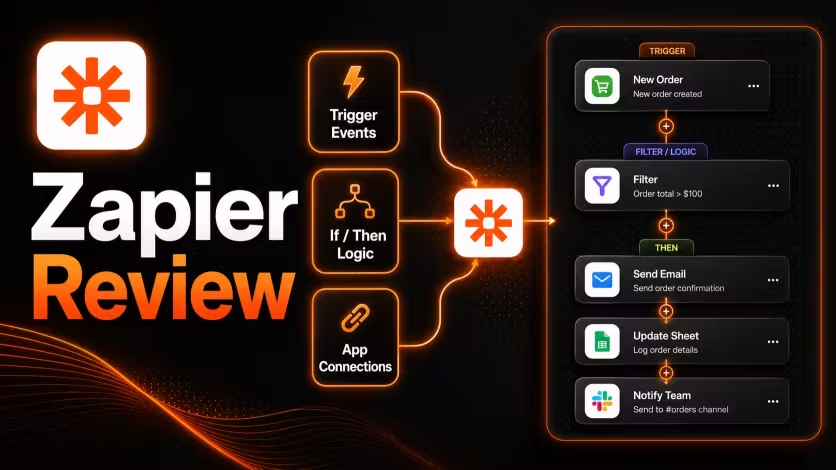
Zapier connects apps so that when something happens in one, something else happens automatically in another. A form submission creates a task. A new order fires a Slack message. A customer email updates a record in your CRM. You set the rule once and Zapier runs it every time the trigger fires, without you touching it again.
How Zapier Works
Every Zap has a trigger and one or more actions. The trigger is the event that starts the chain. The actions are what Zapier does in response. Where Zapier becomes genuinely useful is when you chain several actions together from a single trigger: one new order can update a spreadsheet, notify a Slack channel, create a task, and send a confirmation email, all without you doing anything. You build that sequence once and it runs.
Pricing
Monthly or annual billing is available, with annual saving roughly 33%.
Professional is the first plan that allows unlimited Zaps and conditional logic, meaning if/then rules that let a Zap behave differently depending on the order details or customer data. Team adds shared workspaces and admin controls for organisations with multiple users.
Why Plans Fill Up Faster Than Expected
The trigger itself does not count against your monthly task limit, but every action after it does. So if your Zap does three things when an order comes in, adding it to a spreadsheet, sending a Slack notification, and creating a follow-up task, each order consumes three tasks rather than one.
At 200 orders a day, that single Zap burns through 600 tasks daily, which is 18,000 tasks per month before you have added return notifications, low stock alerts, or ad spend updates. The Professional plan's 2,000 monthly tasks runs out in a few days at that volume. Zapier's own pricing documentation acknowledges that the number of tasks needed depends on how frequently Zaps run and how many actions each one completes, so for a store processing significant order volume, the plan that looks adequate at signup often is not.
What Zapier Is Built For
Zapier works best when you want something to happen automatically the moment a specific event occurs.
- New form submission creates a task and notifies the team
- New paid order adds a spreadsheet row and sends a confirmation
- New support ticket routes to a project board and pings a channel
- Customer tag updated kicks off a follow-up sequence
- Invoice received creates an accounting entry
- Restock request form sends the team a notification
For this kind of work, where one event should trigger a chain of actions across multiple apps, Zapier is the best tool in its category. The setup is fast, the builder is visual, and once a Zap is running it requires almost no maintenance.
Where Zapier Stops Working
Zapier runs into its limits when you shift from asking "what should happen when this order comes in" to asking "what is happening across my whole store right now."
A new order tells you one sale happened. It does not tell you whether that product is still profitable, whether you are running low on stock, which items are performing well this week, or which fees are quietly eating into your margins. Answering those questions requires all your data in one place, organised and updated regularly on a schedule, not accumulated one row at a time as individual events trickle through.
We tried building Amazon reporting with Zapier and it fell apart quickly. Adding one spreadsheet row per order sounds like reporting until you realise you have a long list of orders and no way to see what is actually going on across the business. For sending alerts and triggering automations it is still in our stack, but for building a report the team can open every morning and trust, it is the wrong tool for the job.
Zapier Pros and Cons
Pros
- Connects 7,000+ apps, more than any comparable automation tool, which means it can almost certainly handle the specific workflow you have in mind.
- Chains multiple actions from a single trigger without any coding, which makes complex cross-app workflows accessible to anyone on the team.
- Visual builder with AI-powered suggestions makes setting up new Zaps fast even for non-technical users.
- Strong documentation and an active community mean answers to almost any workflow question are already written somewhere.
- Free plan covers basic usage across 5 Zaps, which is enough to test whether the tool fits before committing.
Cons
- Every completed action counts as a task, so high order volume burns through monthly limits much faster than the plan tier suggests.
- Cannot pull historical data or refresh a full report on a schedule, as it only reacts to new events as they occur.
- Conditional logic and if/then rules inside Zaps are locked to the Professional plan at $49/month.
- Zapier Tables and Interfaces are separate products that add cost and their own learning curve.
- Each app connection is authenticated separately, which creates maintenance overhead when passwords or permissions change across a large number of integrations.
Real User Ratings
G2 and Capterra reviewers consistently praise ease of setup and the breadth of apps it connects to. Trustpilot complaints cluster around being charged after hitting task limits without clear warning and slow support responses on lower-tier plans.
Who Should Use Zapier
Use Zapier if you want things to happen automatically when a specific event occurs, if you need multiple apps to communicate without writing code, if your team works across several tools that currently require manual handoffs between them, or if your store processes a manageable order volume where task-based pricing stays predictable.
Who Should Look Elsewhere
Skip Zapier if you need all your Amazon, Shopify, or Walmart data pulled into one Google Sheet you can analyse, if you want a report showing what happened across your whole store rather than just the most recent events, or if your order volume is high enough that paying per action becomes expensive before the automations deliver enough value to justify it.
Where Gorilla ROI Fits
Zapier and Gorilla ROI do different jobs and we run both. Zapier handles the automations: send this alert, create that task, update this record when something specific happens. Gorilla ROI handles the reporting: Amazon, Shopify, and Walmart data pulled into Google Sheets on a schedule so the team can see what is happening across the business without waiting for individual events to come through.
If your team needs to know what sold yesterday, which products are running low on stock, and which fees shifted last week, that requires pulling all your store data on a regular schedule rather than catching individual events as they happen. Gorilla ROI earns its cost when your team opens Google Sheets in the morning and the data is already there waiting for them.
Gorilla ROI is the wrong call if you need automations between apps, if your Amazon revenue is under $150K and a weekly manual export still takes under 20 minutes, or if your team does not work from Google Sheets daily.
Alternatives
For a full breakdown, see our Zapier alternatives guide.
Final Zapier Review Score
Common Questions
Is Zapier free?
Yes, the free plan covers 100 tasks per month across 5 Zaps. For a store with real order volume that runs out quickly, but it is enough to test a workflow before committing to a paid plan.
How does Zapier pricing work?
You pay for tasks, where each action Zapier completes counts as one task. A Zap that does three things per order uses three tasks per order, not one. Plans scale by how many tasks you need per month and what features you need access to.
Can Zapier pull Amazon data into Google Sheets?
Zapier can add a new spreadsheet row every time an Amazon order comes in, and for tracking individual orders as they happen that works fine. For a complete picture of sales history, inventory levels, fees, returns, and advertising spend across your whole catalogue, adding one row per order does not give you enough to work with.
Is Zapier good for ecommerce?
Zapier is good for ecommerce automations such as order alerts, CRM updates, task routing, and notifications triggered by individual events. For building a reporting sheet with all your store data refreshed on a regular schedule, the one-event-at-a-time approach runs into limits quickly.
What is Zapier's biggest limitation?
Zapier only reacts to things as they happen. You cannot ask it to go back and pull the last 90 days of orders, and you cannot schedule it to refresh all your store data every morning. It is built to catch new events and act on them, and that is where it stays.
How many apps does Zapier support?
7,000+ integrations, more than any comparable automation tool currently available.
4.8 Rating · 11k+ Downloads · Trusted by Sellers








More Tested Reviews


.svg "Abstract fluid wave design with soft purple gradient")



Power My Analytics

Jungle Scout vs Gorilla ROI



.avif "Glowing abstract purple shape with psychedelic outline")
Try Gorilla ROI Free For 30 Days
Replace the Manual Spreadsheet Work and Save 40 Hours a Month