.svg "Gorilla ROI")

Article Summary
🟤 Amazon FBA reimbursements recovery claims fail at scale because the process breaks, not because the policy is unclear. First submission denials, case closures, and missed escalation windows are the real killers.
🟤 High-volume sellers who recover the most run reimbursements as a standing weekly operation with three distinct functions: error detection, case management, and financial reconciliation.
🟤 The most effective setup pairs Gorilla ROI for data visibility with a dedicated claim service like Getida for execution. Each does one job and neither steps on the other.
Amazon FBA reimbursements recovery is what I've been dealing with since 2012.
That's when I started selling on Amazon.
As our selling account kept growing to where we were at $200k per month in revenue, we started noticing the gap between what we thought Amazon owed us and what actually landed in our account. We weren't losing money on any single line item. We were losing it in 30 places at once, each one small enough to ignore, together big enough to matter.
Even today with Amazon's ridiculous revenue minus 7 deferred transactions policy, the gap is getting bigger and bigger. It makes cash flow difficult and tracking even more so.
That's the reimbursement problem at scale. It's not one big mistake. It's a hundred small ones that compound because no one built a system to catch them.
Before diving into the recovery system, you need to know exactly what claim types exist, what the filing windows are, and how Amazon calculates what they pay. That's covered in the FBA inventory reimbursement policy guide. This article picks up where that one ends.
Where the Recovery System Breaks Down
Reimbursements intersect finance, operations, and compliance. When mismanaged, the impact shows up later: inventory counts are skewed, margins appear thinner than they are, and cash flow planning becomes unreliable.
Teams often fail because reimbursements are treated as exceptions rather than a recurring process. Without oversight and a defined cadence, valid claims expire unnoticed, and systemic errors compound as order volume grows.
Your Process Is the Problem, Not Amazon's Policy
You're not losing money because Amazon's policy is unfair. The policy is clear. You're losing money because your process breaks under volume.
At 20 SKUs, a manual review every quarter catches enough to feel like it's working. At 200 SKUs across inbound shipments, fulfillment center operations, customer returns, and removal orders, a quarterly cadence means you're always 60 to 90 days behind. The oldest claims are expiring while you're still finding the newest errors. You're not running a recovery process. You're running a cleanup operation on money you already lost.
The sellers I know who get back $400k to $600k per quarter aren't smarter. They built a system with a weekly cadence, clear ownership, and three distinct functions that don't overlap.
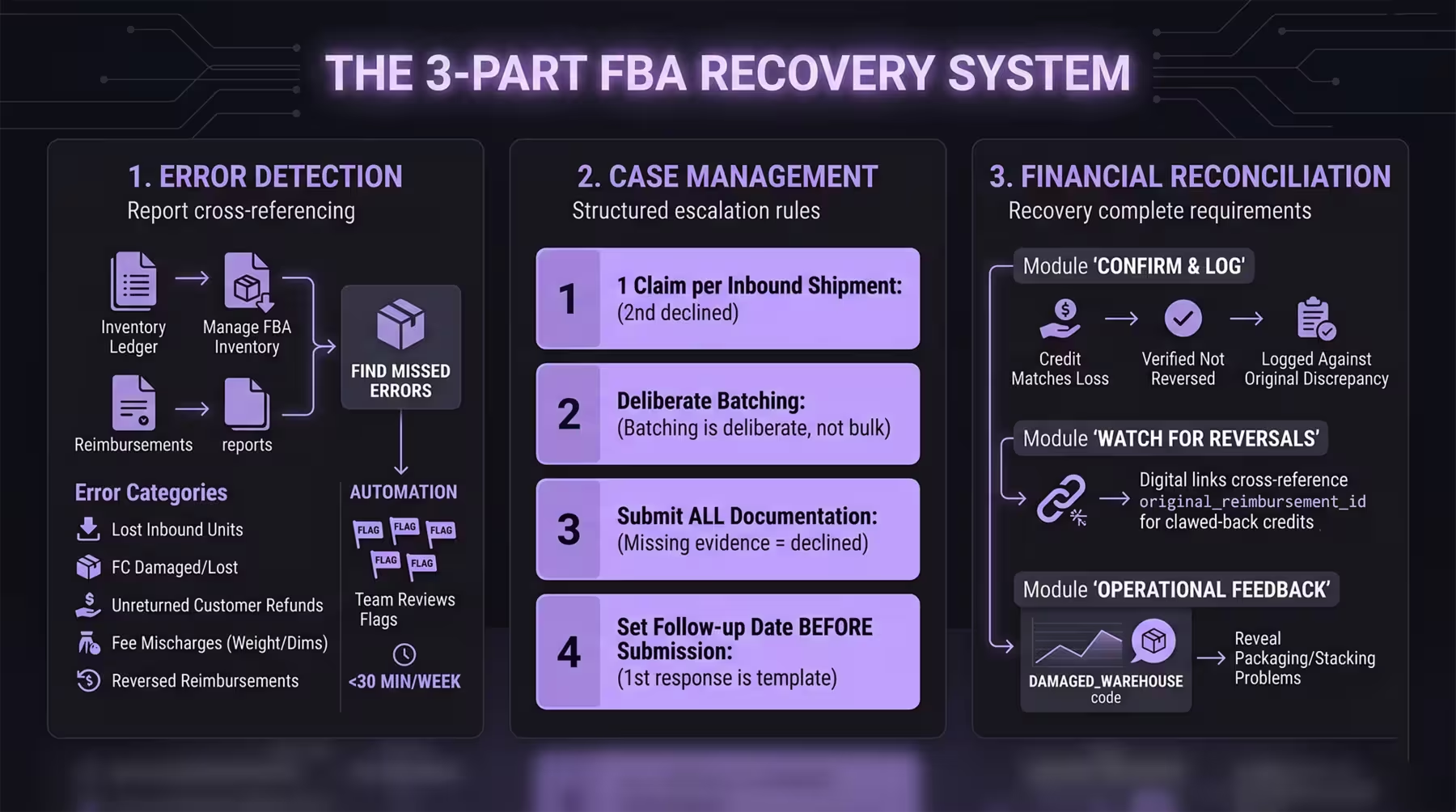
The 3-Part Recovery System
1. Error Detection
Detection is not the same as reporting. Pulling the Reimbursements report tells you what Amazon already processed. Error detection means cross-referencing the Inventory Ledger, the Manage FBA Inventory report, and the Reimbursements report to find what Amazon missed.
The errors worth catching fall into five categories: lost inbound units, units damaged or lost in the fulfillment center, customer refunds where the item was never returned, fee mischarges due to incorrect weight or dimension data, and reversed reimbursements where Amazon clawed back a credit.
At scale, the goal is not to find every error manually. It's to structure your data so errors surface themselves. When the Inventory Ledger adjustment code shows LOST_INBOUND and the Reimbursements report shows no matching payout for that FNSKU in that window, that is a flag. Your team reviews flags, not raw exports. Teams running this review on a live Google Sheet connected to Gorilla ROI report cutting detection time from a multi-hour CSV exercise to under 30 minutes per week.
2. Case Management
Filing a claim is not the same as recovering money. Amazon's first response to a reimbursement case is unreliable. Cases are closed with generic responses. Valid claims get declined because a support agent did not read the documentation. If you do not follow up with a structured escalation, the case closes and the window starts running.
There are four rules that govern how you file, and breaking any one of them costs you the claim. You can file only one claim per inbound shipment. A second claim for the same shipment is declined without review. Amazon's volume rules limit how many cases you can open in a short window, so batching is deliberate, not bulk. All required documentation goes in on the first submission, because missing evidence gives Amazon a clean reason to decline with no obligation to reopen. And every filed case needs a follow-up date set before the submission goes in, because the first response is almost always a template.
Amazon evaluates only the documentation you submit, not your intent. Consistency and escalation discipline recover significantly more than single-submission attempts.
3. Financial Reconciliation
Recovery is not complete when Amazon issues a credit. It's complete when you've confirmed the credit matches the loss, verified it was not reversed, and logged it against the original discrepancy in your books.
Amazon reverses reimbursements. If a unit is reimbursed and later found, the credit is clawed back. If you are not cross-referencing the original_reimbursement_id column in your reimbursement data against new reversals, you are counting recovered money that Amazon already took back.
Reconciliation also tells you which error types recur. If you see DAMAGED_WAREHOUSE codes on the same ASIN repeatedly, that is a packaging or stacking problem that costs you on every shipment. The reimbursement data is not just a claims tool. It is operational feedback.
The Two-Tool Setup That Works at Scale
There is a separation of roles that high-volume sellers use that makes the whole system more reliable. One tool handles visibility. One handles execution. Neither does both.
Gorilla ROI: Visibility
Gorilla ROI pulls your Amazon reimbursement data, inventory ledger, and fee data into Google Sheets on a set schedule. Your team sees every reimbursement event, every adjustment code, every reversal, and every open discrepancy in one place. No downloads. No CSV alignment. Just a live sheet your team reviews on a fixed weekly schedule.
That visibility feeds the detection step. You can see which FNSKUs have open claim windows, which events have no corresponding payout, and which reimbursements were reversed after they were issued.
Getida: Execution
Getida audits your FBA account, identifies missing reimbursements, files claims with the correct documentation, and follows up until the case resolves. They handle the submissions, the escalations, and the follow-ups so your team does not have to.
They work on a percentage of recovered funds. At smaller account sizes, that percentage is a reasonable outsourced cost. Above a certain revenue threshold, you compare that percentage against the cost of a dedicated in-house role and the math shifts. Getida's institutional knowledge of Amazon's case management system is hard to replicate quickly, but the cost compounds as your recovery volume grows.
How the Two Work Together
The two tools do not overlap. Gorilla ROI gives your team the data to know what is owed. Getida does the operational work of getting it back. If you are running both, your team reviews the Gorilla ROI sheet to confirm Getida's recoveries match the discrepancies you flagged. That cross-check catches the gaps either tool would miss working independently.
Key Terms
FAQ
Do Amazon FBA reimbursements actually get paid out?
Yes, when claims meet Amazon's documentation and submission requirements. The failure rate comes from process problems: missed windows, incomplete evidence, and no follow-up on declined cases. A structured recovery system with a fixed weekly cadence recovers significantly more than an occasional audit.
What is the difference between an Amazon reimbursement service and doing it yourself?
A reimbursement service like Getida handles detection, filing, and follow-up on your behalf and charges a percentage of recovered funds. Doing it in-house means your team owns the full process: detection, submission, escalation, and reconciliation. In-house keeps 100% of the recovery. A service removes the operational burden. Above roughly $50,000 in monthly reimbursement exposure, the in-house math starts to close.
Why do valid Amazon reimbursement claims get denied?
Amazon evaluates only the documentation submitted, not intent. First denials are automated in most cases. Claims fail when documentation is incomplete, when the wrong claim type is filed, or when follow-up does not happen before the case closes. Structured escalation paths recover more than single-submission attempts.
How do I know if Amazon reversed a reimbursement they already paid?
The reversal shows up in your reimbursement data as a new transaction linked to the original reimbursement ID. Without a structured data review, reversals go unnoticed and your team counts money Amazon already took back. The original_reimbursement_id column maps every reversal back to its original credit.
How often should I run a reimbursement review?
Weekly. Amazon's errors happen daily across inbound, fulfillment center operations, customer returns, and removals. A quarterly review means you're perpetually chasing a 90-day lag with claims expiring at the edges. Weekly reviews with a fixed owner and a structured checklist recover more and prevent the window pressure that causes rushed, incomplete filings.
What is the biggest operational mistake sellers make with reimbursement recovery?
Treating a declined case as a final answer. Amazon closes cases without resolution on the first response. Sellers who accept that response lose valid claims permanently. The case management step, tracking reopen windows, escalation paths, and follow-up dates for every filed claim, is what separates teams that recover consistently from teams that recover occasionally.
Recovery Operations Checklist
Forward this to whoever owns reimbursements on your team:
- Weekly review scheduled with a fixed owner and a defined time block
- Reimbursements report, Inventory Ledger, and Manage FBA Inventory report cross-referenced against the same date range
- All events with no corresponding payout flagged for filing eligibility check
- Reversed reimbursements identified via original_reimbursement_id and logged against original discrepancies
- Open cases tracked with follow-up dates and escalation paths defined before submission
- Recovered amounts reconciled against original losses in the books, not against revenue
A reimbursement review that takes more than 90 minutes per week is a data access problem, not a process problem.
Amazon FBA reimbursements are recoverable at any volume when the detection, filing, and reconciliation functions each have a clear owner and a fixed cadence. The teams getting back the most money are not spending more time on this. They built the right structure once and let it run.